Employee Productivity and Time Tracking
Software for Modern Teams
Simplify employee time tracking and boost team productivity with smart work management software designed for modern businesses.
Trusted by Leading Teams
Smart Time Tracking
Smarter Time Tracking. Better Results
01
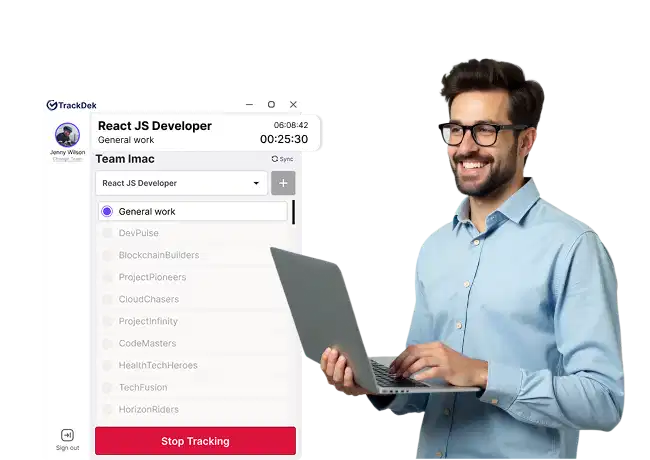
Personalized Time Tracking
That Fits Every Role
That Fits Every Role
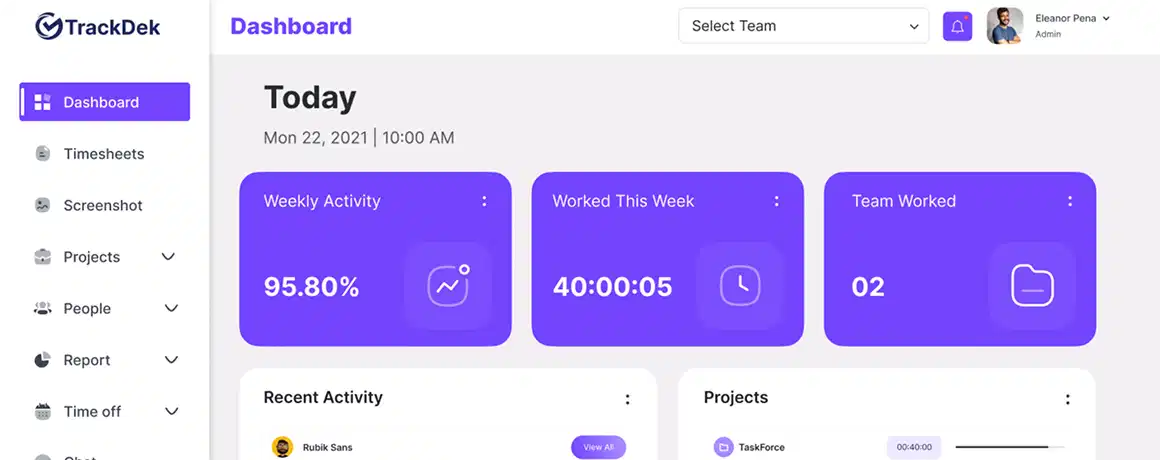
Tracker is an advanced employee productivity and work tracking software that helps businesses monitor employee activity, track accurate working hours, and manage daily tasks from one unified platform. This privacy-friendly employee monitoring system enhances workplace transparency and team accountability.
 Centralized employee productivity software with a powerful dashboard for task management, time tracking, and work activity monitoring.Easily assign daily tasks and track real-time progress to improve team accountability and performance.Ideal employee monitoring and productivity tool for remote, hybrid, and in-office teams.
02
Insightful Timesheet Analytics for Better Decisions
Timesheet Analytics software delivers real-time insights into employee work hours, attendance tracking, and workforce productivity. Businesses can generate accurate employee timesheets, monitor performance across daily, weekly, and monthly periods, and use detailed productivity reports to make data-driven decisions that improve workforce efficiency, accountability, and overall operational performance.
Real-time employee time tracking and attendance monitoring to improve workforce visibility and accuracy.Track employee performance daily, weekly, and monthly with detailed productivity insights.Empower managers and HR teams with data-driven workforce analytics for smarter decision-making.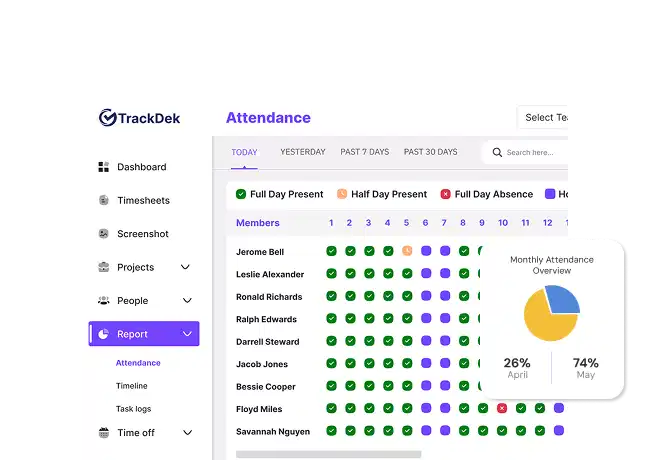
03
Streamline Work with Advanced
Task & Project Management
Task & Project Management
Project and task tracking software helps teams plan projects, organize tasks, assign work, and monitor real-time progress from a centralized platform. It improves project visibility, task management, and team productivity while supporting seamless collaboration, stronger accountability, and efficient workflow management without adding unnecessary complexity.
Organize projects and assign tasks with clear priorities using powerful project management software.Gain better visibility into project timelines, deadlines, and task progress in real time.Boost team productivity and accountability with streamlined task tracking and collaboration tools.Get Started on Any Device
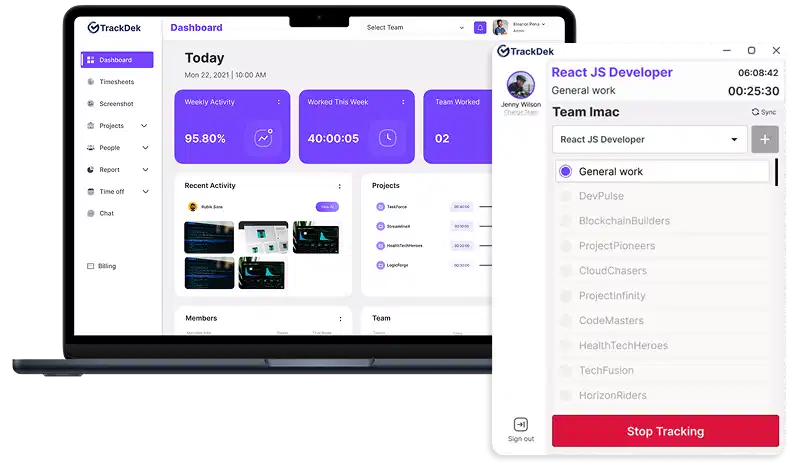
Download Employee Time Tracking Software for Windows, macOS, and Linux
Features
Key features to boost your productivity

Silent Tracking
Automatically starts with Windows and runs quietly in the background, so you can focus on work without distractions.

Screenshots
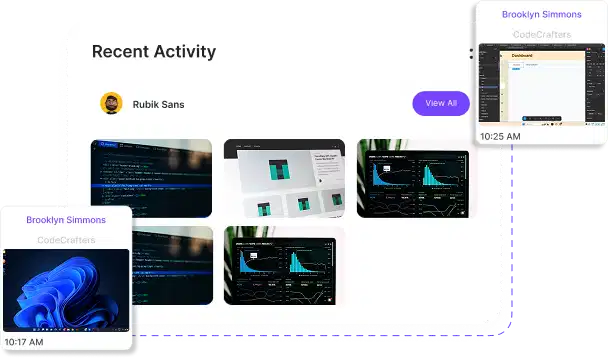
Snapshots capture work activity in real time, helping you validate hours and monitor progress efficiently.

Task Tracking
Assign and track tasks seamlessly while gaining clear visibility into progress and team workload.

Realtime Productivity
Access detailed, real-time insights into work patterns, task progress, and active hours to boost productivity.

Smart Reporting
Create timesheets, productivity charts, and task summaries automatically with zero manual work.

Cross-Device Sync
Multi-OS Sync lets you track productivity effortlessly across Windows, macOS, and Linux.
Project Management
Convert Every Tracked Hour Into Business Growth
Timesheets
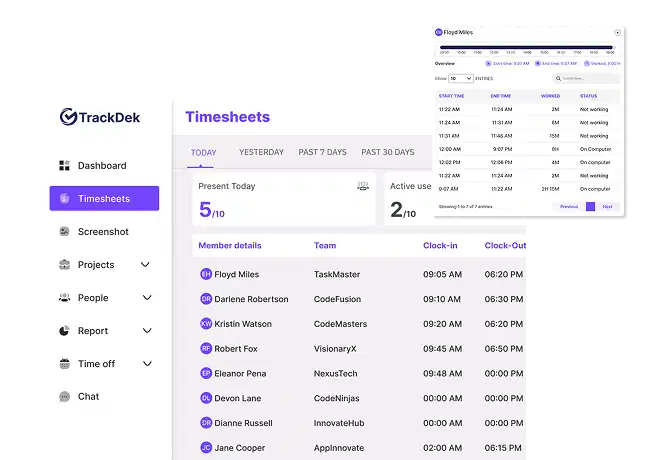
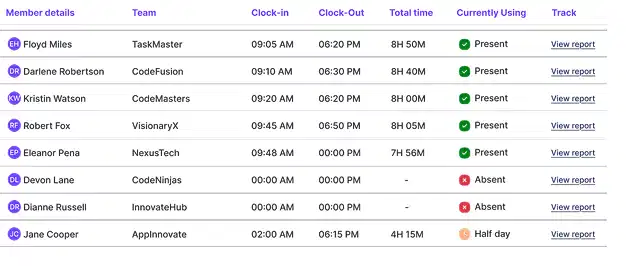
TrackDek Timesheets helps teams accurately track both automated and manual work hours using an easy clock in/out system, all from one smart dashboard. It provides clear productivity insights by monitoring activity levels, mouse clicks, and work patterns, while generating detailed reports for daily, weekly, and monthly analysis. This makes it easier for managers to understand performance, improve efficiency, and ensure transparent time tracking without adding complexity to the workflow.
Learn More 
Screenshots
TrackDek Screenshots automatically capture work activity every 3–8 minutes with admin-controlled limits, giving teams a clear and transparent view of actual working time. Along with screenshots, it provides productivity insights such as mouse clicks, keyword hits, and activity levels, all organized into detailed, team-wise reports. This helps managers monitor performance, ensure accountability, and make data-driven decisions from a single, easy-to-use dashboard.
Learn More
Projects
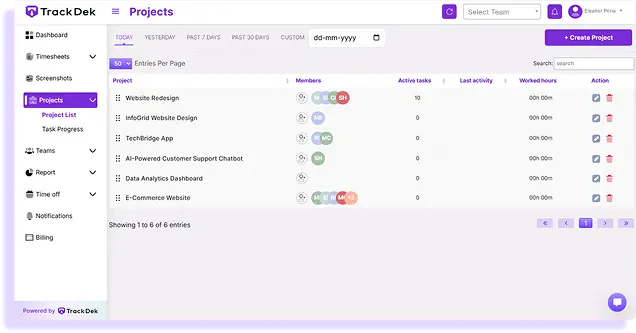
TrackDek Projects helps teams manage projects and tasks efficiently by bringing everything into one organized workspace. Teams can track worked hours, monitor task status, add comments, and view real-time activity, ensuring better visibility, smoother collaboration, and improved productivity across all projects.
Learn More
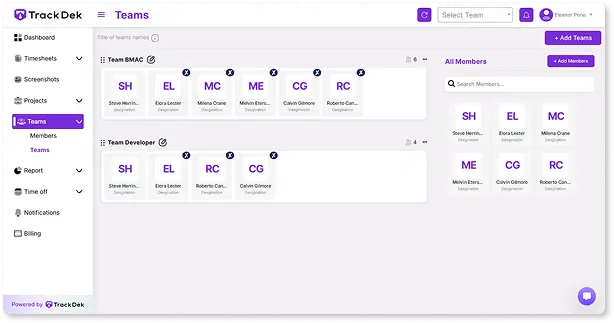
Teams
TrackDek Teams helps businesses manage teams and members efficiently from a single, centralized platform. It allows you to track work hours, automate billing, set hourly or monthly salaries, and monitor team productivity, making workforce management simpler, more transparent, and more effective.
Learn More
Report
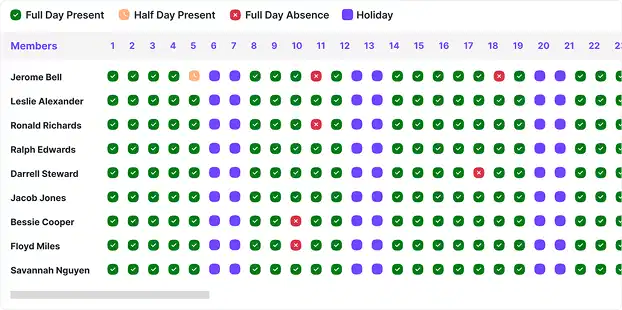
TrackDek Reports helps businesses easily track employee attendance through clear, calendar-based reports. It allows you to monitor present, absent, and half days, manage leaves, and calculate accurate salaries, giving you complete visibility and effortless control over attendance and payroll management.
Learn More
Reviews
Hear from our satisfied clients

 (4.5)
(4.5)

“It helps us track working hours, manage daily tasks, and get clear productivity reports without invading employee privacy. The platform is easy to use, well-structured, and saves a lot of manual effort. A smart and reliable solution for managing teams efficiently. Highly recommended”

Sarah M.
Small business owner
 (4)
(4)
“TrackDek has made it very easy to monitor work hours, manage daily tasks, and maintain transparency within our team. The interface is simple, user-friendly, and perfect for businesses that want productivity insights without invasive location tracking. Highly recommended for smart work management!”

James T.
Project Manager
(3)
“It provides clear visibility into working hours, daily tasks, and productivity without unnecessary monitoring. The reports are helpful for attendance, performance review, and payroll accuracy. Easy to use, well-organized, and ideal for modern HR management.“

Owen Haley
HR Manager
(3.5)
“It helps us track working hours, manage tasks, and monitor productivity in a clear and organized way. The system is easy to use and gives accurate reports without focusing on GPS or intrusive tracking. Very useful for project monitoring, team coordination, and performance analysis. A reliable tool for IT companies.”

Roy Hayes
IT Team Lead
(4)
“It allows us to track working hours, manage daily tasks, and monitor team productivity across multiple projects. The reports make it easy to evaluate performance and plan resources without micromanaging. Simple interface, clear insights, and perfect for fast-paced agency work. Highly recommended.“

Makayla Barry
Agency Owners
(4.5)
“It helps us manage tasks, track working hours, and understand team productivity without adding complexity. The platform is easy to set up, cost-effective, and gives clear reports that support better decision-making as we scale. A smart solution for growing teams.”

Kyle Huff
Startup Founder
Pricing
Plans designed to fit your workflow
Monthly
Annually
STARTER
You have used 0% of Storage
 Limited Users
Computer Activity Monitoring
Timesheet & Attendance Tracking
Employee Screenshots Every 10 Minutes
Last 14 days screenshot retention
Email support
Limited Users
Computer Activity Monitoring
Timesheet & Attendance Tracking
Employee Screenshots Every 10 Minutes
Last 14 days screenshot retention
Email support
Plus
For long teams optimizing their work productivity for the long term
Unlimited tracking
Single team
Computer activity tracking
Timesheet and attendance
Unlimited Storage
Employee work screenshots every 5 minutes
Last 3 months screenshot retention
Live Support
Pro
For long teams optimizing their work productivity for the long term
Everything in Plus
Unlimited teams
Advanced Reporting
Premium Support
FAQ
Answers to your common questions
TrackDek is an employee productivity and work tracking software that helps businesses track working hours, manage tasks, monitor work activity, and generate detailed reports from a single platform.
TrackDek is ideal for startups, HR teams, IT companies, marketing agencies, and growing businesses that want better visibility into employee productivity and attendance without micromanagement.
TrackDek focuses on ethical, privacy-friendly employee monitoring and does not rely on invasive tracking methods. Instead, it provides clear insights into working hours, tasks, productivity, and attendance through smart reports and dashboards.
TrackDek provides detailed employee productivity, attendance, and work reports, including working days, leaves, half-days, and monthly summaries. These reports help HR teams and managers with performance reviews, workforce analysis, and payroll processing.
Yes. TrackDek allows teams to assign, manage, and track daily tasks while monitoring project progress and team productivity from a centralized dashboard.
Yes. TrackDek is designed with a simple, user-friendly interface that makes it easy for employees, HR teams, and managers to use without special training, helping teams adopt productivity and time-tracking tools quickly.
Yes. TrackDek automatically tracks employee attendance based on working hours and activity levels, showing present days, absent days, half days, and total working days in detailed attendance reports and calendar views.
Blog
Explore trends, tools, and time - saving tips
Get Started on Any Device
Download for Windows, macOS, or Linux and start tracking marter wherever you work.
